TL;DR
High availability means designing your infrastructure so that no single failure can take your service offline. You achieve it by running two or more servers behind a load balancer that routes traffic only to healthy machines.
A production-ready redundant server configuration also requires redundancy at the network and power level, plus ongoing monitoring and tested failover, not just extra hardware. |
Every server fails eventually, no matter how well you maintain it, and that’s not pessimism but just how hardware works. A disk dies, a power supply gives out, a bad software deploy locks up the process, or a sudden traffic spike overwhelms a machine that was never sized to handle it alone.
When your site lives on a single server, any of those events can paralyze your site, resulting in lost sales, frustrated users, and a dent in your search rankings. A proper redundant server configuration is the practical answer to that problem, and that’s exactly what this article walks you through.
What You’ll Learn
- What high availability actually means and how it’s measured in real downtime numbers
- Why a single server is a single point of failure, and why backups don’t fix that
- What a load balancer does and how health checks keep traffic away from failed nodes
- The difference between active-active and active-passive setups, and how to choose
- Why shared state (databases, files, sessions) is the genuinely hard part of redundancy
- What it actually takes to run a redundant configuration in production
What High Availability Actually Means
High availability, often shortened to HA, describes infrastructure designed so that no single failure takes the whole service down. The goal is simple: if one component breaks, something else picks up the load without the user noticing.
In practice, availability is measured in “nines,” a shorthand for the percentage of time a system stays online. The table below translates those percentages into real downtime numbers, which makes the business stakes much clearer.
| Availability | Annual Downtime |
99.9% ("three nines")
99.99% ("four nines")
99.999% ("five nines") | ~8 hours 45 minutes
~52 minutes
~5 minutes |
Reducing the annual downtime is no easy task, with each additional nine getting significantly harder and more expensive to achieve. The right target depends on how much downtime your business can actually tolerate. A personal portfolio can probably live with 99.9%, but then an e-commerce store processing transactions around the clock would require a very different calculation.
Why One Server Is a Single Point of Failure
A single server can fail in more ways than most people think. Hardware failures are obvious ones, and their examples are a dying disk, a failed power supply, a bad memory module. But hardware is only part of the risk. A single server is equally vulnerable to failed software deployments, runaway processes that consume all available memory, and unexpected traffic spikes that overwhelm its resources.
It’s worth being clear about what backups do and don’t solve here. A backup restores your data after the fact. It does not keep your site online while you’re restoring it. Depending on the size of your data and the speed of your restore process, you could be looking at hours of downtime even with a perfect backup in hand.
That gap between “data is safe” and “service is running” is exactly what a redundant server configuration is designed to close. Redundancy keeps the service online while you deal with the failed component, rather than forcing you to race to restore from backup while your users see a blank screen.
What a Load Balancer Does
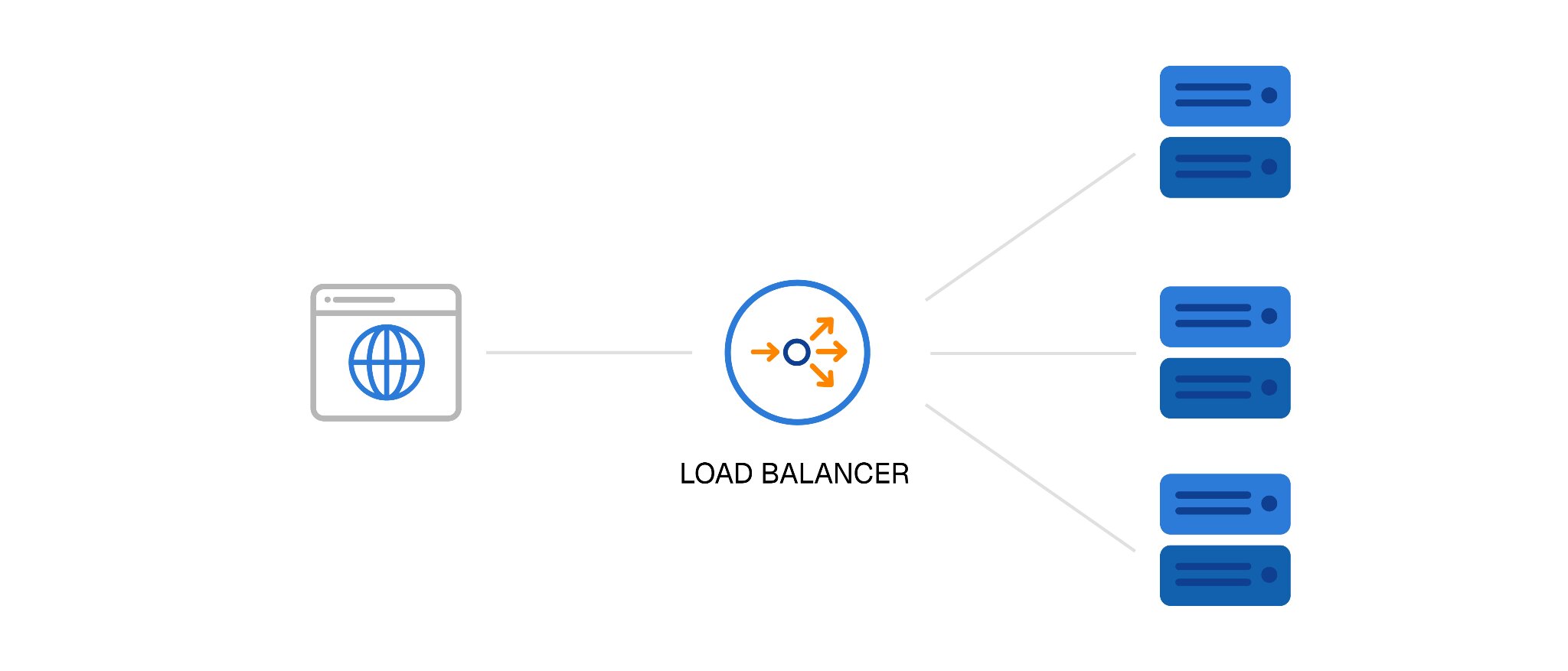
A load balancer is the traffic director that sits in front of your backend servers. Instead of DNS pointing directly at a single server, it points at the load balancer, which then decides which backend server to forward each incoming request to.
That single role gives you two critical benefits: distributed load and automatic failure routing.
Traffic Distribution
With two or more servers behind a load balancer, no single machine has to handle all of your traffic. Instead, incoming requests are distributed across available servers using a load-balancing algorithm, such as:
- Round robin, where each server takes turns handling requests
- Least connections, which directs new requests to the server with the fewest active connections.
The result is a more efficient use of resources and infrastructure that scales as you add servers, rather than being constrained by the limits of a single machine.
Health Checks
This is the part that makes HA work. The load balancer’s goal is to distribute traffic, but it doesn’t do it blindly. It regularly tests each backend server to confirm it’s responding.
If a server stops passing health checks, the load balancer pulls it out of rotation automatically and stops sending it traffic. When the server recovers and starts passing checks again, the load balancer adds it back. From the user’s perspective, a server failure is invisible.
L4 vs. L7 Load Balancing
You’ll sometimes see load balancers described as Layer 4 or Layer 7, which refers to which part of the network stack they operate at.
- Layer 4 routes based on connection-level information: IP addresses and ports. It’s fast, simple, and works for most use cases.
- Layer 7 reads the actual content of the request, such as HTTP headers, URL paths, and cookies, and can make smarter routing decisions based on that. For example, routing requests for /api/ to one server pool and requests for static assets to another. It adds a small amount of overhead but gives you much finer control.
For most setups, L4 is enough to start. L7 becomes worth the complexity when you need content-aware routing or more granular control over how different types of traffic are handled.
Active-Passive vs. Active-Active

Once you have a load balancer in place, you need to decide how your backend servers share the work. There are two main models:
Active-Passive
One server handles all incoming traffic while a second server sits on standby. If the active server overloads and fails, the standby takes over, typically via a floating IP address that gets reassigned to the standby automatically.
The main advantages are simplicity and lower cost. The tradeoff is that the standby server is idle most of the time, and there’s usually a brief window during failover while the switchover happens. For many applications, that brief gap is acceptable.
Active-Active
Two or more servers handle traffic simultaneously. The load balancer spreads requests across all of them. If one fails, the remaining servers absorb its share of the traffic without any switchover delay. You also get more total capacity, since all your servers are doing useful work at all times. The tradeoff is that active-active is more complex to configure and more expensive to run.
Choosing between them comes down to budget and downtime tolerance. A small online store that can absorb a 30-second switchover during a failover event will do fine with active-passive. A business where any visible interruption translates directly into lost revenue should lean toward active-active.
The Hard Part: Shared State and Data
Here’s the thing most introductory guides skip: distributing web traffic across servers is the straightforward half of high availability. Keeping your data consistent across those servers is where things get genuinely complex. If you’re planning a redundant server configuration, read this section carefully.
Database Replication
Your application’s database can’t reside on a single server if you want true redundancy, as it simply becomes another single point of failure. A common approach is a primary-replica configuration, where all write operations go to the primary database while one or more replicas stay synchronized by continuously replicating its data.
In other words, if the primary fails, a replica can be “promoted” to take over. The challenge is ensuring replication stays reliable, failover is properly configured and regularly tested, and split-brain scenarios, where multiple nodes mistakenly believe they are the primary, are prevented or resolved quickly.
File Storage
Adding extra servers improves redundancy, but it doesn’t solve the problem of file storage. User uploads, media files, and any other content written to disk must be available to every server in the cluster.
Here’s why: a user uploads a file that is stored on Server A, but their next request is routed to Server B, which has no copy of that file. The result is missing content and a broken user experience.
To avoid this, files should be stored on shared storage, such as a network file system or object storage service, that every server can access. Alternatively, you can use a reliable file synchronization system.
Session Handling
If a logged-in user’s next request gets routed to a different server than their previous one, and sessions are stored locally on each server, they’ll get logged out. An issue, a quite irritating one, for a user who is in the middle of completing a purchase.
The solution, though, is centralized session storage with a shared cache that every server reads from and writes to. It’s not complicated to implement, but it’s easy to overlook until a user reports a mysterious logout issue in production.
These three areas are where redundant configurations require real expertise to get right. Being honest about this is important because it’s also where a managed hosting partner earns its keep.
What It Takes to Run This in Production
A redundant server configuration isn’t a one-time setup. It’s something you run, monitor, and maintain continuously. Here’s what production HA actually requires:
- Two or more servers: whether managed VPS or dedicated servers, depending on your performance needs.
- Redundant infrastructure underneath: redundant power and network at the data center level, so your redundant server setup isn’t sitting on a single power feed or network path.
- Monitoring with alerting: you need to know the instant a node fails, not when a user tweets at you about it.
- Tested failover: untested failover is a guess, not a safety net. You need to know it works before you need it.
- 24/7 coverage: servers don’t fail on a schedule. Someone needs to be watching at 3 a.m. on a Saturday.
This is where the value of managed hosting becomes concrete. Running a redundant setup on managed VPS servers or dedicated servers means the configuration, monitoring, and failover management are handled by people who do this every day — so you don’t have to build and staff your own ops team to keep it running.
Build Your Redundant Setup on Managed Infrastructure
High availability is worth the investment for any site where downtime has real consequences, like lost revenue, damaged reputation, or unhappy customers. But the setup lives or dies on the infrastructure underneath it, and the team keeping it healthy around the clock.
Host4Geeks runs managed VPS and dedicated servers on redundant power and a Tier-1 multi-homed network, with proactive 24/7 monitoring and expert support. That’s the foundation a redundant server configuration needs without requiring you to hire and manage your own operations team.
Ready to move beyond a single point of failure? Talk to our team about building a redundant setup that fits your workload.
Frequently Asked Questions
What is a redundant server configuration?
A redundant server configuration is a setup where two or more servers work together so that if one fails, the others keep the service running. Traffic is routed through a load balancer that monitors server health and automatically stops sending requests to any node that goes down. It’s the foundation of high availability for web applications and services.
What’s the difference between a load balancer and failover?
A load balancer distributes incoming traffic across multiple servers and reroutes it when a server fails; that rerouting is the failover. Failover refers specifically to the process of switching from a failed component to a healthy one. A load balancer is the mechanism that makes failover happen automatically, without requiring manual intervention.
Do I need active-active or active-passive?
It depends on your budget and how much downtime you can tolerate. Active-passive is simpler and cheaper, but there’s a brief switchover window when the standby takes over. Active-active gives you higher capacity and smoother failover, but costs more to run. Most small to mid-sized businesses start with active-passive and move to active-active as their traffic and uptime requirements grow.
How many servers do I need for high availability?
Two is the minimum, where there is one to handle traffic and one to take over if the first fails. In practice, three or more gives you better fault tolerance, especially in active-active setups where you want the surviving nodes to absorb the failed node’s load without becoming overwhelmed. The right number depends on your traffic volume and how much headroom you want.
Can high availability completely eliminate downtime?
No, and anyone who tells you otherwise is overpromising. HA dramatically reduces downtime by eliminating single points of failure, but it doesn’t make downtime impossible. Five nines (99.999%) availability still allows about 5 minutes of downtime per year.
Does Host4Geeks set up and manage redundant server configurations?
Host4Geeks doesn’t offer a one-click HA product, but configures and manages redundant setups built on managed VPS and dedicated servers running on redundant power and Tier-1 network infrastructure. That includes configuration, monitoring, and failover management, so you get a production-ready, redundant server configuration without staffing your own ops team.




























 Guides