People love fast loading sites. This is especially true for customers visiting e-commerce websites. An average customer will be happy, more satisfied and will likely to visit your site again thus increasing your conversion rate. On the flipside, users have no patience for slow loading websites. According to Google, 53% of consumers are likely to abandon sites that take more than 3 seconds to load. This shows how crucial site performance is. In fact, so important is site performance that Google has made site speed a factor in ranking websites to give consumers the best user experience. As a web administrator, you would, therefore, need to do everything possible to boost your site’s performance for higher rankings and enjoy a higher conversation rate.
Installing Varnish on cPanel?
What is Varnish?
Written in C language under FreeBSD license, Varnish is a free and open source HTTP accelerator that was built for speeding up dynamic and content heavy sites that get massive traffic. Essentially, Varnish acts as a reverse proxy for your web server. Varnish accelerator sits at the front of your web server and serves requests by a factor of about 300 to 100 times, thereby easing the workload of your CPU. It receives HTTP requests and answering them from the cache. If a request cannot be answered, it is forwarded to the backend whereupon a response is fetched, stored in the cache and later delivered to the client. When a response is cached, it is delivered in microseconds, many times faster than your typical web server.
What is Caching and What are its Benefits?
Caching is the practice that involves the storage of files in memory to be served or used again. Storage of files in memory boosts the speed of access by making easily available to client requests, instead of files being downloaded over again. A classic example of caching is when a user browses a website. In the background, objects like JavaScript files, stylesheets and images are stored in the browser’s cache to eliminate the need of having to download them again. By so doing, the webpages load faster, and this reduces the server load and bandwidth usage.
Varnish takes caching to a whole new level. When a user visits a web server for the first time, the web server will serve the HTTP request, but Varnish will save a copy of the client request. The next time someone visits the same page, Varnish will automatically take note that the requests have been made earlier and will expeditiously respond by serving a cached version of the request. This action accelerates the speed by up to an extraordinary 300 to 1000 times! What this also implies is that should the site experience immense traffic, it will be better equipped to handle the request without impacting negatively on the site speed and server resources such as CPU. The amount of CPU required to return a cached result is much lower compared to serving a new request altogether.
Varnish can also act as a load balancer, thereby speeding up websites by storing the cache in RAM. This fundamental ability to serve requests by caching requests is what enhances your site’s performance and speed.
In addition to its performance capabilities, Varnish comes with a flexible configuration language called VCL. With VCL you can seamlessly configure policies which determine how incoming requests will be handled by the HTTP accelerator.
Varnish supports modern versions of Linux, FreeBSD, OS X as well as Solaris and derivatives of Solaris.
A few notable companies that use Varnish on their sites include Wikipedia, Reddit, Vimeo, and Facebook to mention but a few.
In this guide, we will dive in and see how to install and set up Varnish 6.2 as a proxy on your cPanel server.
Let’s jump right now!
Installing Varnish HTTP Cache
Before proceeding to install Varnish, ensure to do a pre-flight check of the prerequisites needed.
Prerequisites
- Server running cPanel
- Root SSH access to the server.
Step 1. Installing EPEL Release
The first step in installing Varnish 5.2 is to ensure that the EPEL repository is installed on your system. EPEL is an acronym for Extra Packages for Enterprise Linux. This is done by executing the command below
# yum install -y epel-release
Additionally, you can use the command below
Step 2. Installing Varnish on CentOS 7
Next, we are going to install pygpgme package which will handle GPG signatures as well as yum-utils which is a collection of handy features. To achieve this, Run the following command
# yum install pygpgme yum-utils
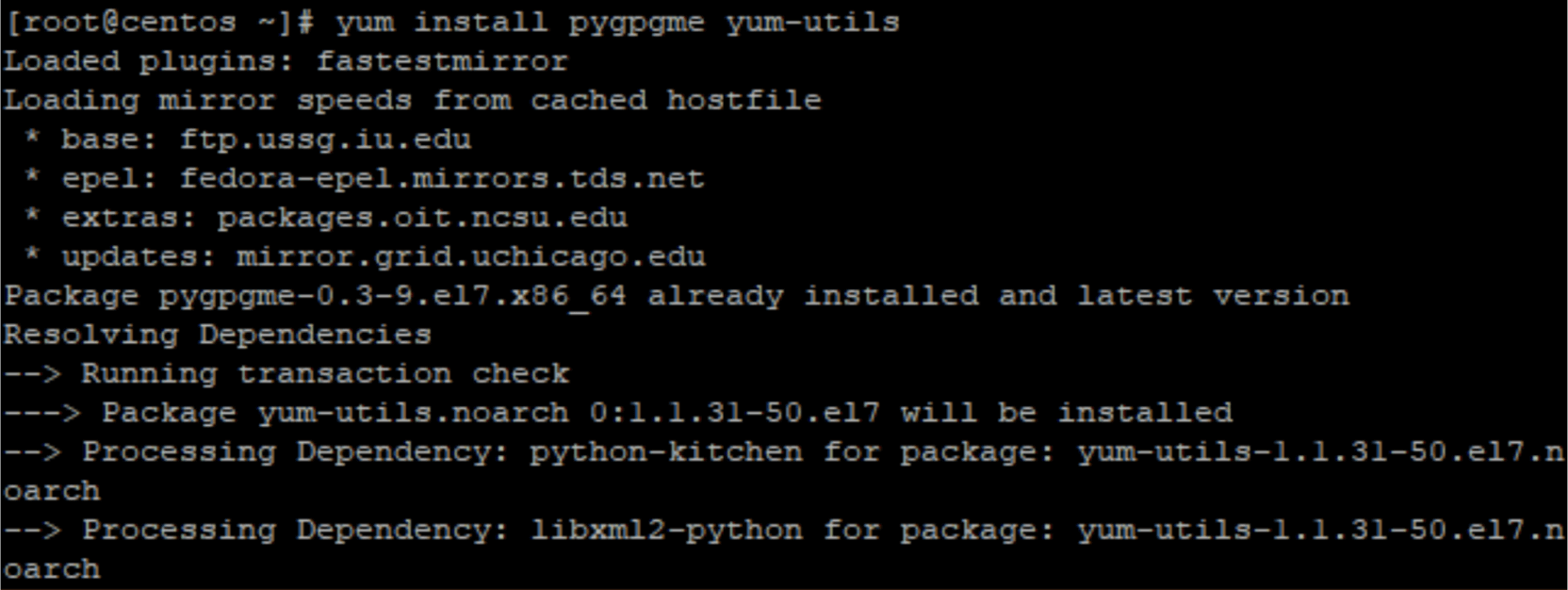 As of writing this article the latest version of Varnish available for CentOS 7 / RHEL 7 is 6.0.3-1and is available from packagecloud.io.
# wget --content-disposition https://packagecloud.io/varnishcache/varnish60lts/packages/el/7/varnish-6.0.3-1.el7.x86_64.rpm/download.rpm
# rpm -i varnish-6.0.3-1.el7.x86_64.rpm
After successful installation, run the following command to verify if varnish is running
# systemctl status varnish
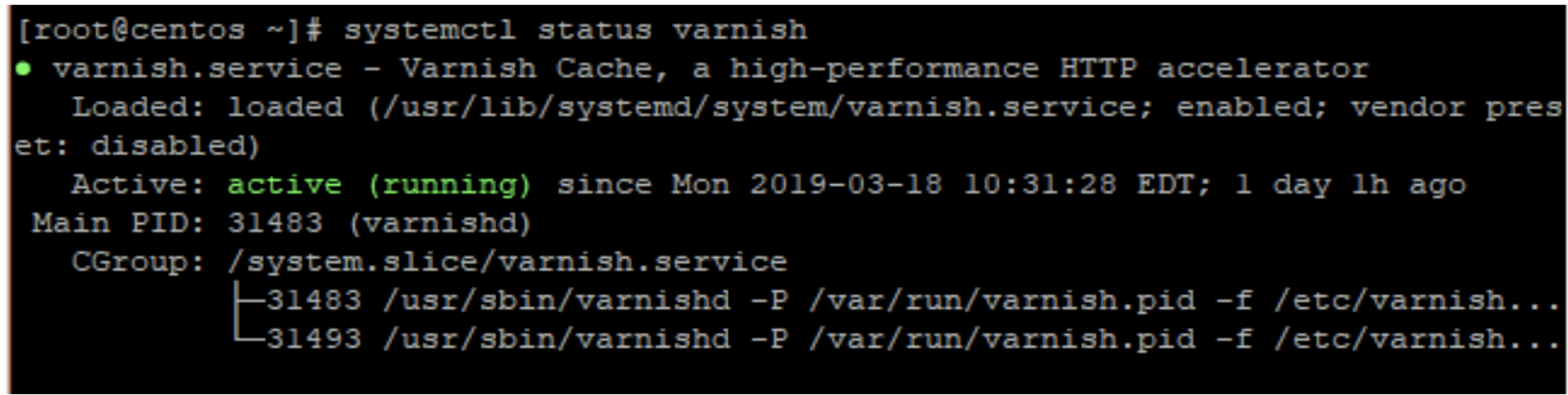
Usually, the executable will be located at /usr/sbin/varnishd path and configuration files will be located at /etc/varnish path.
To confirm the path of Varnish executable run
# which varnishd
To check the version of Varnish installed, run
# varnishd -V

Step 3. Configuring Apache Webserver to Work with Varnish HTTP Cache
The final step is to configure Apache webserver to work with Varnish. Apache runs on port 80 by default. We need to change this to a different port so that only Varnish runs on port 80. In this example, we will change the default httpd port in CentOS 7 to listen to port 8080.
This can easily be achieved using the ‘sed’ command
# sed -i "s/Listen 80/Listen 8080/" /etc/httpd/conf/httpd.conf
Next, edit the Varnish environment config file and locate the VARNISH_LISTEN_PORT parameter.
# vi /etc/varnish/varnish.params
Change the default value from 6081 to 80
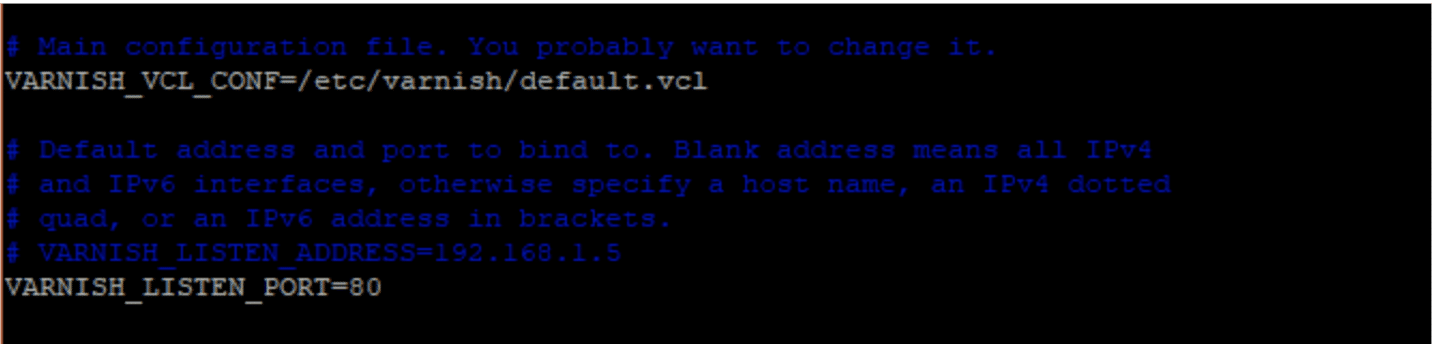
Save and Exit the text editor
Next, make Apache web server as the default back end server. Open the file below
/etc/varnish/default.vcl
Navigate to the backend default section as shown and set the .host attribute to point to your server. In my case, the IP address is 38.76.11.19
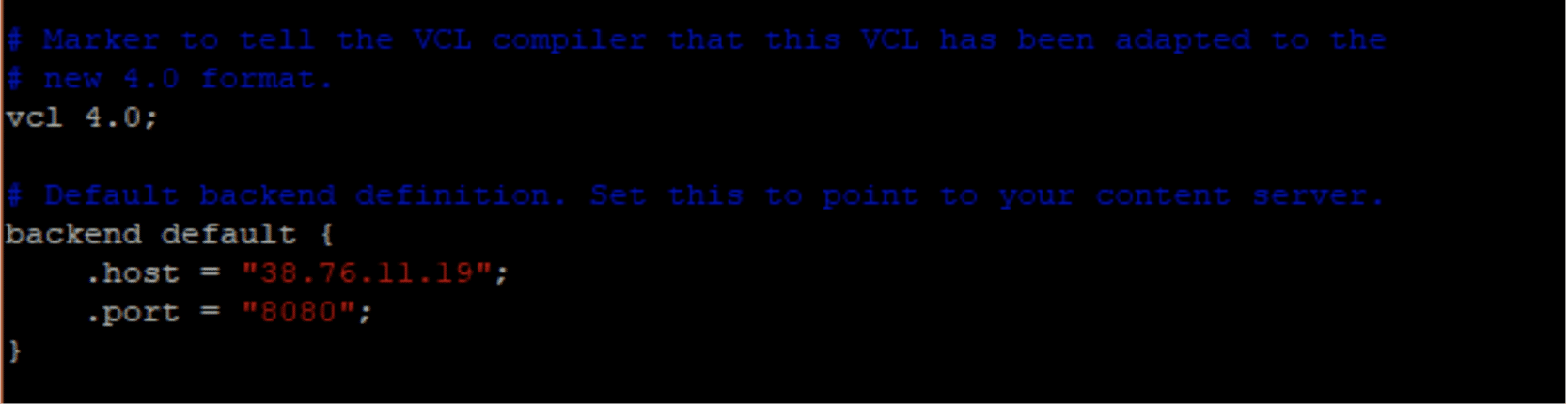
Finally, restart the Apache web server as well as Varnish Cache for the changes to take effect
# systemctl restart httpd

# systemctl restart varnish
Step 4: Testing Varnish Cache
To verify that Varnish is working with Apache Web server use the curl command as shown
# curl -I http://server-ip-address
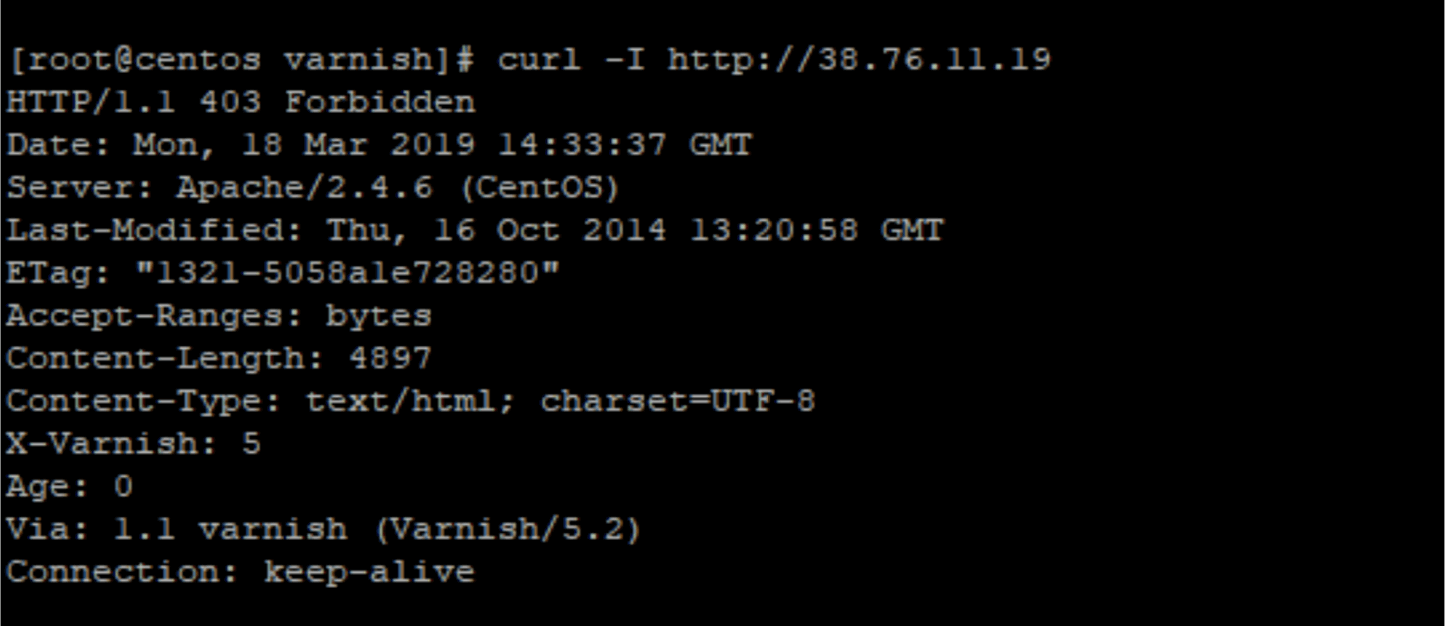
You can also verify that Varnish is running on port 80 and your web server is running on port 8080 using the ‘netstat’ command as shown
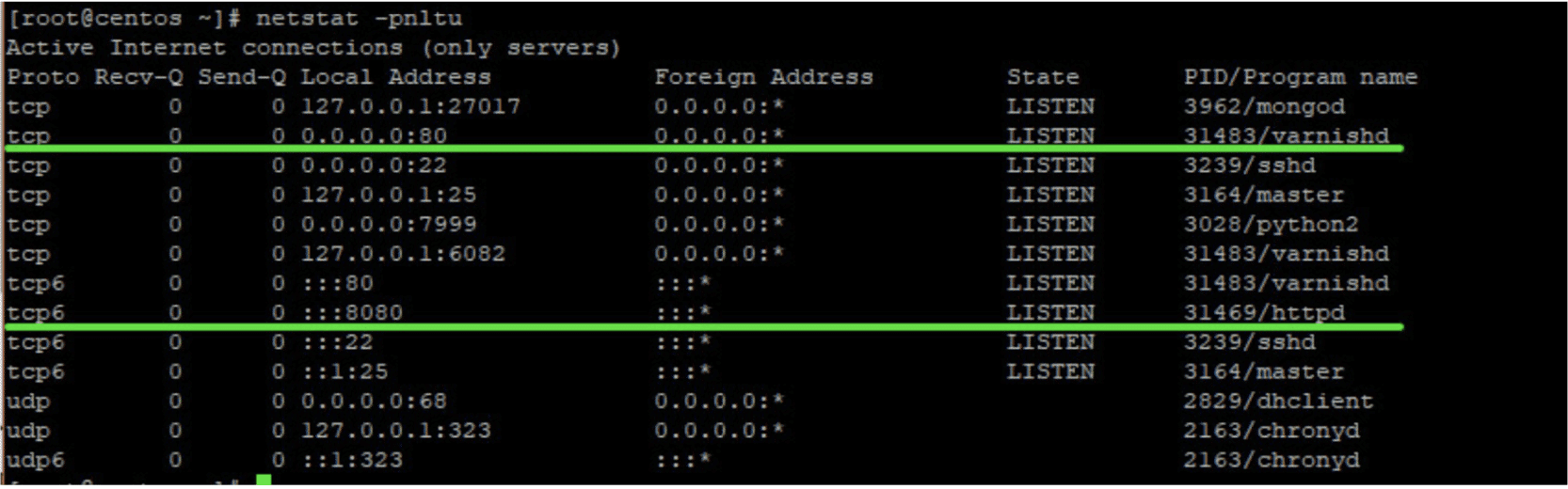
After verifying Varnish and Apache Web server is running as expected, Head out to your Cpanel and Click on ‘Tweak Settings’ located on the sidebar
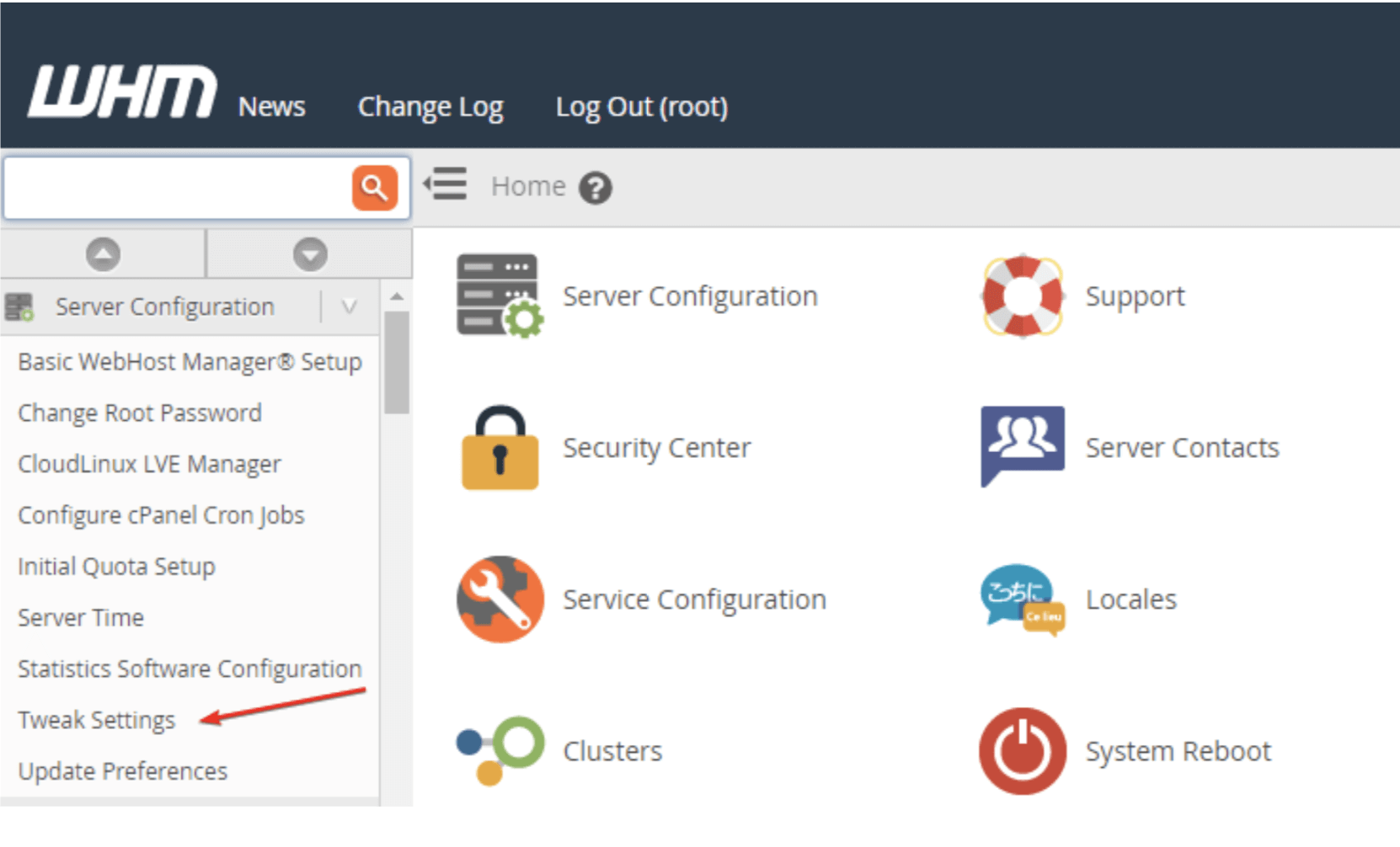
Click on the ‘Settings’ tab and change the default port from port 80 to 8080.
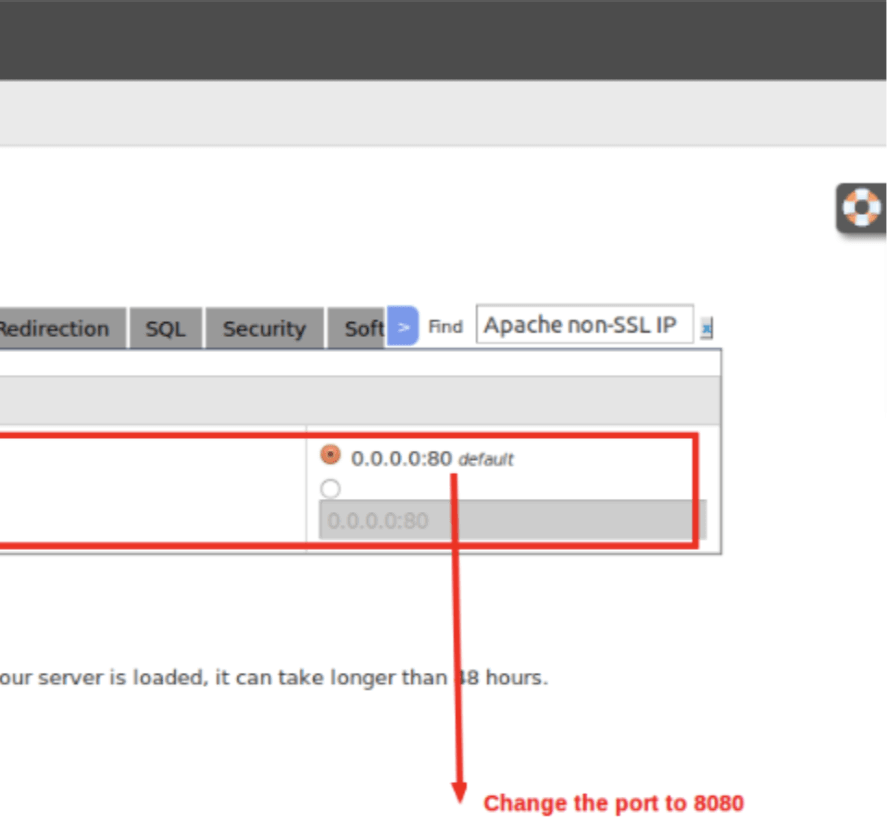
This wraps up our guide on how to install varnish on cPanel. Hope this was helpful to you, if you have any questions please ask them in the comments section below.
If you are interested in using or installing Varnish cache along with your cPanel server, this can be installed on our Managed VPS servers. All our Managed VPSes come with cPanel / WHM and are monitored and supported 24×7 by our experts. Let us do the heavy lifting while you grow your business. Check out our plans.




















 Technology